WhatsApp call route: responsible employee, staff, departments and forwarding step by step
A line’s Calls tab is the call route. The steps go top to bottom in the order the call passes them, and a step’s number is its place in the queue. A step that is off is skipped and gets no number. To turn call intake on, see Set up WhatsApp calls.
Dialogs → Channels → line gear → Calls
| Step | Where it rings | Time |
|---|---|---|
| 1. The customer’s responsible employee | In Dialogs, to whoever owns the customer in the CRM | “How long to wait for the responsible employee”, 5–120 s |
| 2. Employees and departments | In Dialogs, to the chosen people and departments | “How long to ring one staff member”, 5–120 s |
| 3. WhatsApp of the customer’s responsible employee | To the responsible employee’s WhatsApp, from the line’s number | 10–60 s |
| 4. WhatsApp of employees and departments | To the WhatsApp of the chosen people and departments | 10–60 s per round |
| 5. WhatsApp numbers | To the listed numbers | 10–60 s per round |
The first two steps are in Dialogs. The customer’s responsible employee gets the call first, even if they are not among the employees below. No answer in their time, or busy — the call moves on. In “Employees and departments” press “Add an employee or a department” and find people by name. A department gets the call whole, nested departments included; a new member of the department starts getting calls by themselves. Only someone with access to the conversation sees the call.
| Distribution | How it rings |
|---|---|
| Evenly | Calls go round: the next call starts with the next employee |
| In order | Always from the first on the list, then the next |
| All selected members at once | Rings every free employee; the first to answer takes it |
With “In order” the employees are numbered; arrows change the order. An employee already on a call does not get a second one.
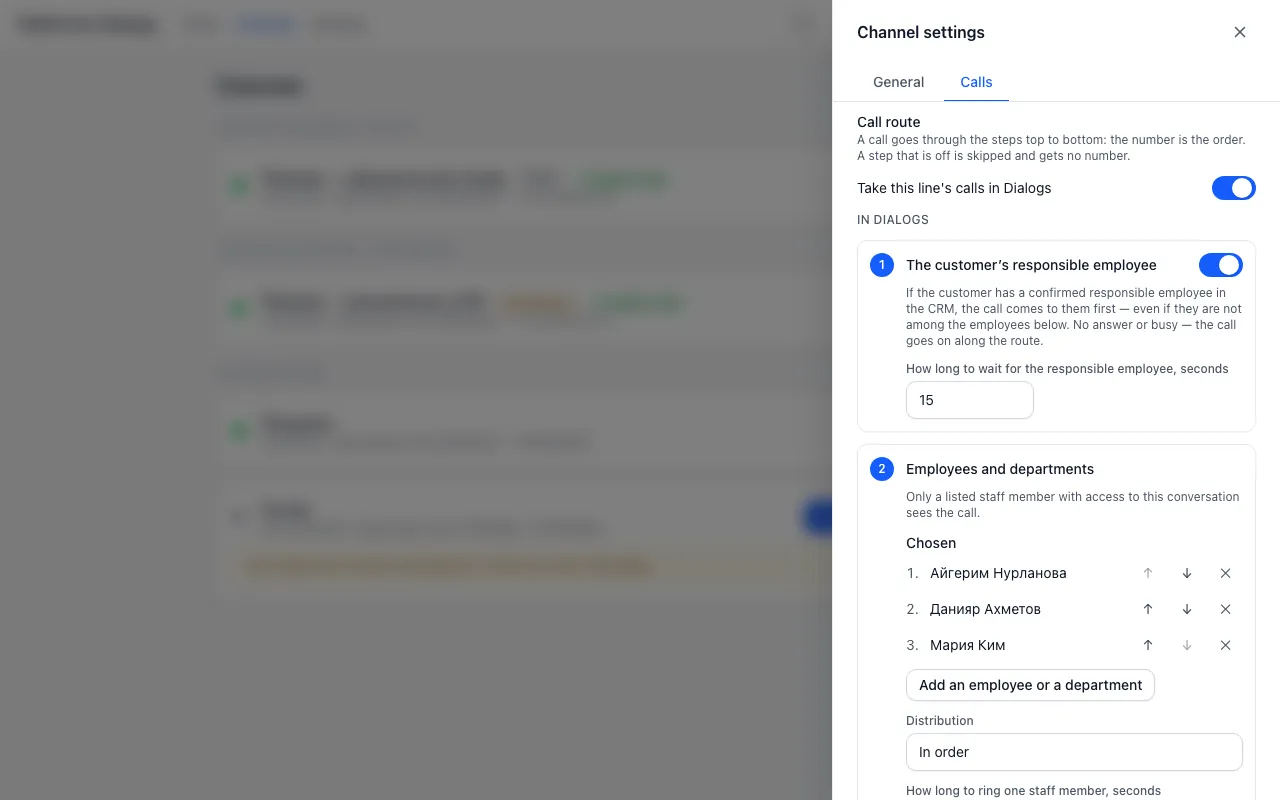
Between Dialogs and WhatsApp stands “If nobody answers in Dialogs”. There you choose what comes next: wait to the end, forward to WhatsApp, or end the call and message the customer. And when: at once if nobody in Dialogs can take the call, after a set number of seconds, or always at once, bypassing Dialogs.
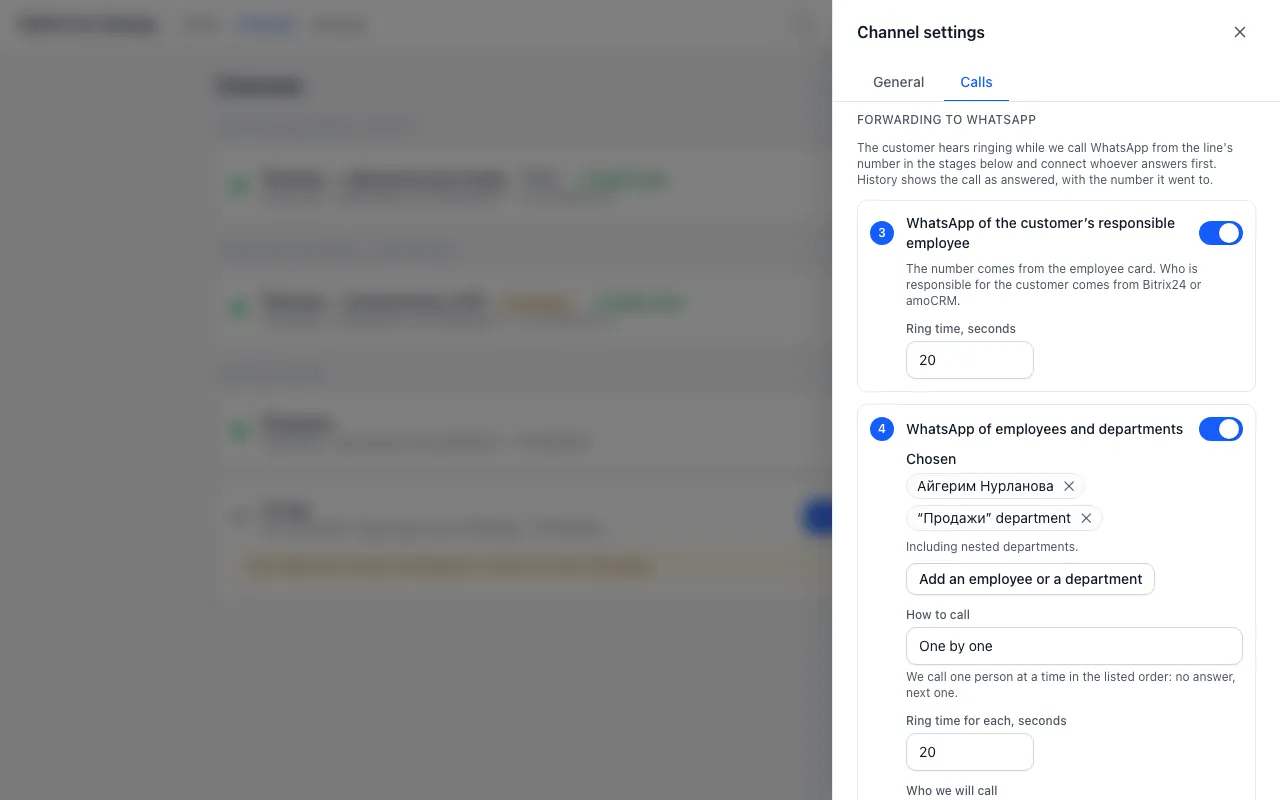
Forwarding to WhatsApp. The customer hears ringing while we call WhatsApp from the line’s number and connect whoever answers first. The call stays in the history as answered, with the name of whoever picked up. Each WhatsApp step has its own switch, and they run one after another.
WhatsApp of the customer’s responsible employee (Off by default) — We ring the employee who owns the customer in Bitrix24 or amoCRM. The number comes from the employee’s card in Dialogs (see below). If no responsible employee is set or they have no number, the step is skipped.
WhatsApp of employees and departments (Off by default) — Add departments and employees. The “Who we will ring” list shows who gets the call; “No WhatsApp number” or “Not on WhatsApp” means this employee cannot be reached — forwarding skips them.
WhatsApp numbers (On by default) — A list of up to 5 numbers. You can pick a Bitrix24 employee — then the number follows their profile by itself.
| “How to call” | What happens |
|---|---|
| All at once | Rings up to 5 people at once and connects the first to answer. If there are more, the next five ring in the next round |
| One by one | One after another in list order |
| By workload | We skip anyone who is on a call now. We ring first whoever took fewer calls today |
The customer waits 2 minutes at most, counted from the start of the call: first the wait in Dialogs, then the WhatsApp steps. Under the steps the form says how many seconds they take of the time left. If not everyone fits, the line “We get to ring N of M” appears — shorten the step times, choose “All at once” or wait less in Dialogs. A number rings once per call, even if it is on two steps.
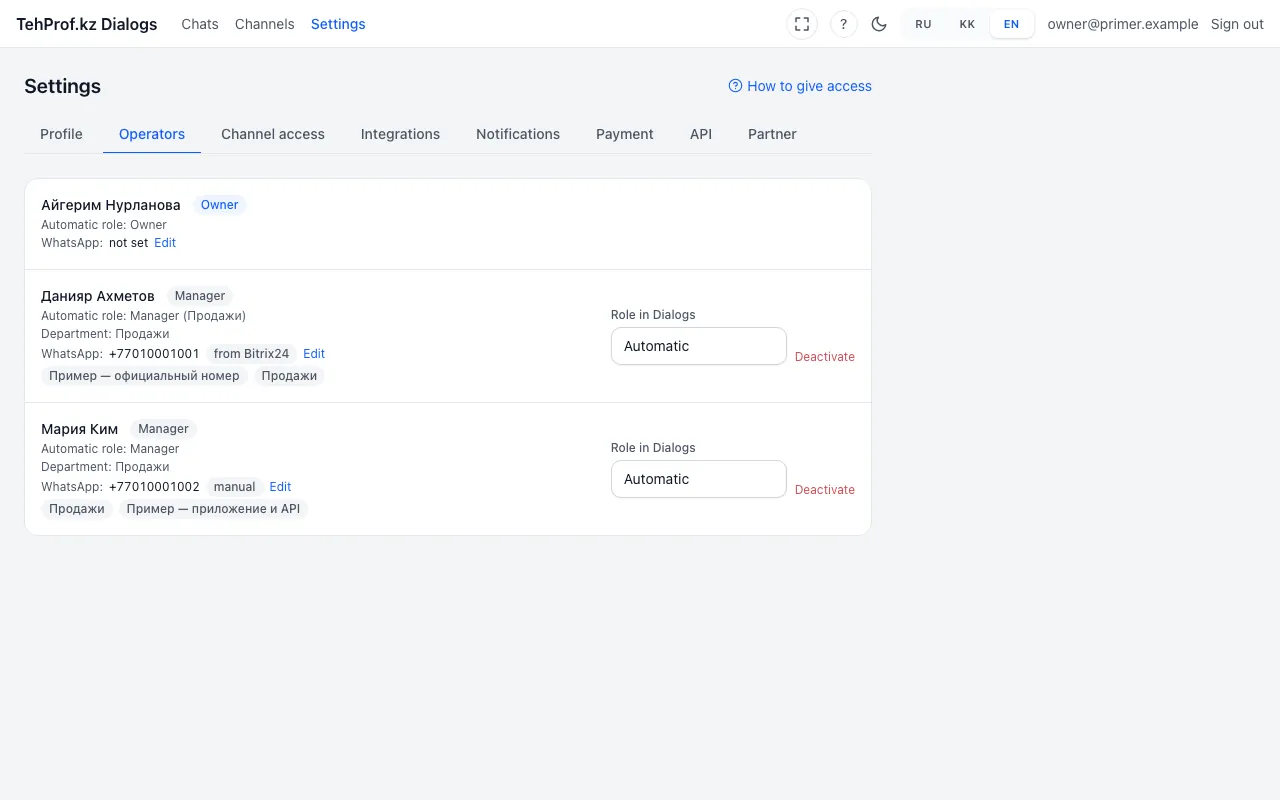
An employee’s WhatsApp number. It is kept in the employee card in Dialogs. The number comes by itself from the Bitrix24 profile (mobile first, then work) or from amoCRM. You can type a number by hand, and then sync does not change it. Leave the field empty and save, and the number is taken from the CRM again.
Dialogs → Settings → Operators → employee row → “Edit”
Next to the number you see where it came from: “from Bitrix24”, “from amoCRM” or “manual”. The “not on WhatsApp” mark means WhatsApp does not know this number. The call will not reach it, so enter another.
- Check the WhatsApp numbers of the employees who will get the call.
- Switch on the stages and order you need, then save.
- Call the line from another phone and do not answer in Dialogs. The call should reach the employee’s WhatsApp from the line number.
- Answer in WhatsApp and check the audio both ways. The call history shows the name of who answered.
An employee did not get the forwarded call. Why?
Check in order:
- The employee has a WhatsApp number in the card and no “not on WhatsApp” mark.
- The stage they are on is switched on, and the ring time did not run out on earlier stages.
- The employee was not on a call at that moment: with “By workload” we skip busy people.
- The call came in business hours: at night it goes only to the night list of numbers.
The responsible employee changed in the CRM. Where does the call go?
To the new responsible employee, as soon as the CRM reports the change. The number comes from their card in Dialogs.
Does the employee see the customer’s number?
No. The call reaches their WhatsApp from the line number. Who called and the recording are in Dialogs, in the customer’s conversation.